

Action Required: Clients using the Wealthscape Investor portal should verify that their security contact information (email address and phone number) is up to date before August 20, 2026.
Beginning August 20, Fidelity will discontinue the “Trusted Device” feature within Wealthscape Investor. After this change, clients will no longer be able to bypass identity verification by using a previously trusted computer or mobile device.
What is changing?
After August 20, clients will:
- Continue logging in with their existing username and password.
- Complete Multi-Factor Authentication (MFA) each time access is required.
- Receive authentication requests using the security email address and/or phone number on file.
Because MFA relies on this information, clients should confirm that their security contact information is current before the change takes effect.
What advisors should do
Please encourage clients who actively use Wealthscape Investor to:
- Review their security contact information before August 20.
- Update their email address or phone number if it has changed.
- Contact you if they experience difficulty accessing their account after the change.
Need Help?
We’ve created the following step-by-step guide with screenshots showing how clients can review and update their Security Contact Information in Wealthscape Investor.
——-
Adding Security Contact Information (First-Time Setup)
When a client logs into Wealthscape Investor without security contact information on file:
Step 1
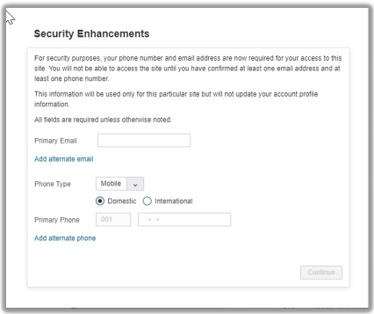
The client will see the Security Enhancements screen.
Step 2
Enter:
- Primary Email Address
- Primary Phone Number
Optional:
- Alternate Email
- Alternate Phone Number
Note: Security contact email addresses are used only for login authentication and do not replace the email address used for eDelivery or account correspondence.
Step 3
Select Continue.
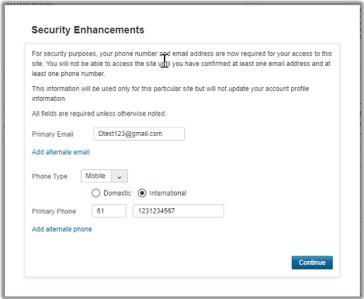
Step 4
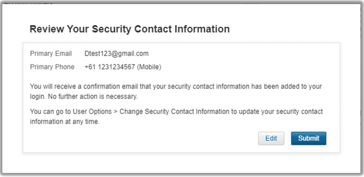
Review the information.
Select Submit.
The client’s security contact information is now saved.
Updating Existing Security Contact Information
If a client already has security contact information on file:
Step 1
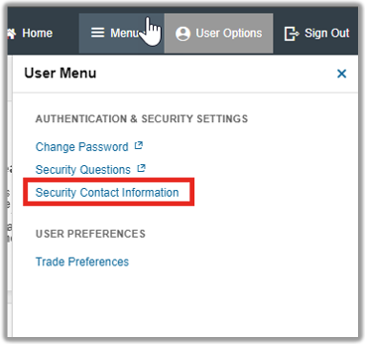
From the Wealthscape Investor home page:
User Options → Security Contact Information
Step 2
Review the displayed email address and phone number.
If everything is correct, select Submit.
If changes are needed, select Edit.
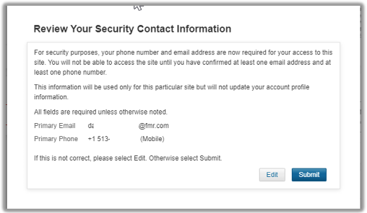
Step 3
Choose:
- Enter New Email
- Enter New Phone
from the applicable drop-down menus.
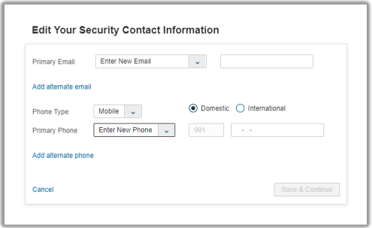
Step 4
Enter the updated information.
Select Save & Continue.
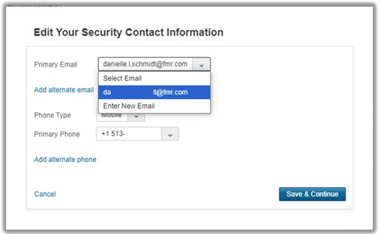
Step 5
Review the information one final time.
If correct, select Submit.
If changes are still needed, select Edit.
Frequently Asked Questions
Does this change my username or password?
No. Clients will continue using their existing login credentials.
Can clients still use Trusted Devices?
No. The Trusted Device feature will no longer be available beginning August 20, 2026.
Will this change my eDelivery email address?
No. Security contact information is used only for authentication and does not update account profile or eDelivery email addresses.
Can clients remove their security contact information?
No. Clients may update their security contact information but cannot remove it entirely.
TC9071699(0826)1